
Adding Support Contact Numbers to the website
Website Theme & Design
Updated
You can update the support phone number(s) displayed on your website directly from your Vacation Labs account.
Steps to Update or Add Phone Numbers
-
Log in to your Vacation Labs account.
- Use your registered email and password to sign in.
-
Navigate to Website Settings.
- From the main dashboard, go to Website → General.
-
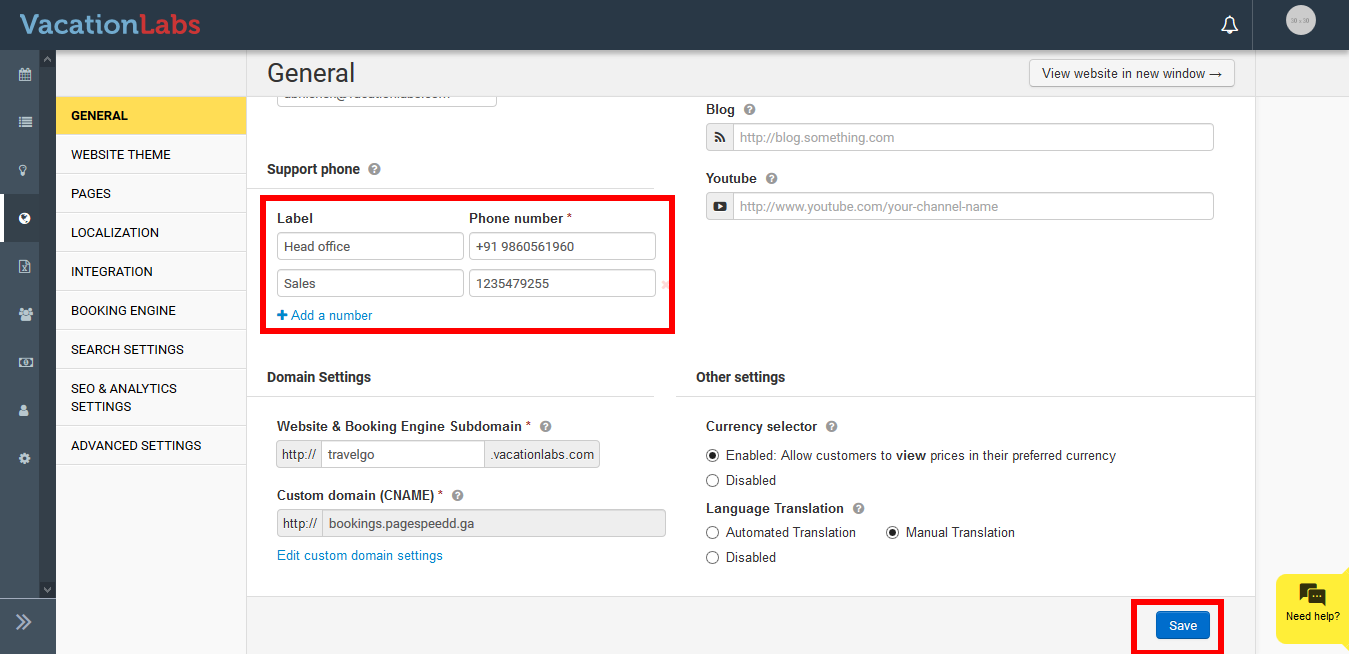
Find the “Support Phone” section.
- Scroll down the page until you see the Support Phone field.
-
Edit or Add Phone Numbers.
-
To update an existing number, simply change the Phone Number and Label fields (e.g., “Sales,” “Support,” “WhatsApp”).
-
To add more than one number, click Add a Number and fill in the new fields for Phone Number and Label.
-
-
Save Your Changes.
-
Scroll to the bottom of the page and click Save.
-
The updated numbers will now appear on your live website.
-
Tip: You can add multiple numbers if you have different departments (for example: Sales, Customer Support, and Emergency).