
Where Your Bookings & Inquiries Come From
Overview
The Analytics dashboard tells you which channels produce bookings in aggregate. This article is about the other direction: looking at a single booking or inquiry and seeing exactly where that customer came from.
Every booking and inquiry created through your website records its traffic source automatically. There is nothing to switch on.
The attribution chip
On both the Bookings and Inquiries lists, each record carries a small source icon next to its reference. The icon reflects the channel — for example a Google Ads click, a paid Meta post, or a referral — and hovering over it shows the full source.
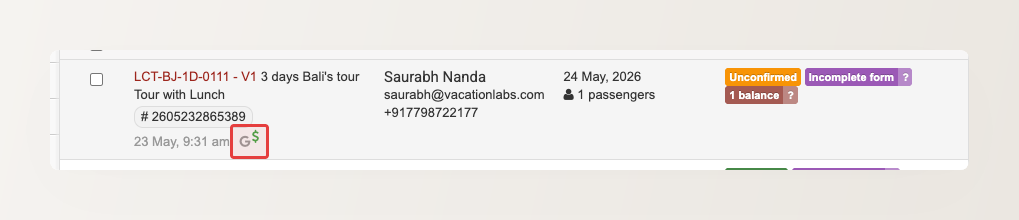

Full attribution on a booking
Open a booking to see its complete source in the right-hand panel of the booking screen. The attribution block lists, where available:
- Campaign — the
utm_campaignthe visit belonged to - Source and Medium — for example
google/cpc, ornewsletter/email - Referrer — the website the visitor arrived from
- Click ID — the ad click that brought the visitor (such as a Google or Meta click)
- Content and Term — the
utm_contentandutm_termvalues, if the campaign set them
Tag your campaigns with utm_* to know which campaign earned a booking. Without tags, a visit is still correctly identified as paid Google or Meta traffic — but the Campaign, Content, and Term fields stay blank, so you can’t tell which specific ad, post, or email it was. Add utm_source, utm_medium, and utm_campaign to the links in your ads, referral placements, and marketing emails so each booking traces back to the exact campaign.
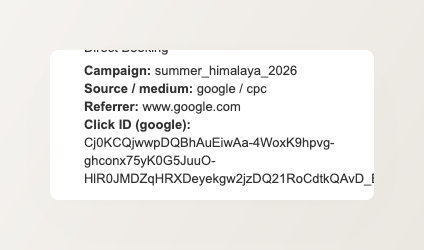
A direct visit with no campaign or referrer simply shows fewer details — there is nothing to attribute it to.
The attribution block is separate from the Booking Source field just above it. “Booking Source” records how the booking was made (a direct booking, or through an agent); the attribution block records where the website visitor came from.
Attribution in your CSV exports
When you export your inquiries or your sales report, attribution is appended as extra columns so you can build your own reports in a spreadsheet:
attribution_utm_source,attribution_utm_medium,attribution_utm_campaign,attribution_utm_content,attribution_utm_termattribution_referrer_hostattribution_click_sourceandattribution_click_id(the ad click that brought the visitor, such as a Google or Meta click)
How the source is captured
The source is recorded at the moment the booking or inquiry is created, from a first-party cookie set on the visitor’s first visit.
The original source is preserved even when checkout sends the customer to a payment gateway and back. So a booking that started from a Facebook ad is still credited to that ad after the customer returns from Razorpay or Stripe to pay — the payment hop does not overwrite where they really came from.
Related Articles
- The Website Analytics Dashboard
- Bulk Importing Inquiries from a CSV File — map a source column so imported leads carry their attribution