Guide • Online Marketing • June 5, 2018 • Rebecca
Tour operators are in a tough industry. The barrier to entry is low and the margins are thin.
You really need to stay updated with business trends and stay connected to your customer to have continuous success. If you have been in the business for long, you already have enough bookings and money coming in. (If you’re not, you should read this article that we did a few weeks ago.) But, you wonder, could you do more? How to boost your marketing? Is there some new platform or trick that would suddenly rocket your sales?
In this article, I want to explain to you once and for all what different overarching marketing channels there are- where all the magic happens, and where the real action is. By the end of this article, you will know what you should do first and how to prioritise your marketing spend. My recommendation- go out and do it once you have found out! Marketing is a fast-changing world, and every time you implement something new, you see the path ahead a little clearer.
You are already in the market, so you know your customer. Marketing starts with the customer and ends with revenue. If you know exactly what your customer is looking for and you can offer it to him, then you are the best marketer in the world. Most of us just have a service (a product, a tour, or a package) and we hope that the customer will find us and want the service. If he doesn’t want the service, we end up ‘selling’ or changing his mind enough that he then wants your service. This is Sales.
Marketing IS NOT branding, or growing your “brand”. Brands are for large organisations which have huge marketing budgets. Their name becomes a pull in itself. Think of the largest online travel agency in your region. For example, Expedia, Priceline, Carlson Wagonlit, Orbitz, Kayak.com come to mind. These are the guys which invest most of their marketing budgets on branding because it brings them business.
Branding efforts by smaller players brings in very, very costly leads- ones which you can’t afford with a small scale business. For mere mortals like us, marketing which results in lead generation (which is measurable, effective, and revenue generating) is the only kind of marketing which makes sense.
In marketing jargon, this is called ‘creating a customer persona’. Forget the jargon. If I ask you who your customer is, can you close your eyes and explain him to me- what he looks like, what he does, what’s his family is like, etc.? That’s knowing your customer.
This sounds difficult to do, but it isn’t really. For somebody who has been in business long enough, he is able to tell if he is talking to a ‘buyer’. If you are new to the tour operator business- define your ideal customer. I find it easier to personify this by thinking of one of my friends or family, and then think of it from a more generic perspective.
For example, If I am trying to start a cycling tour company, I am thinking of my friends from the gym. These guys are super interested in outdoor activities, and have time on their hands during weekends. Also, money doesn’t matter as long as the activity itself gives them a ‘kick’. So, my customers become 30 year olds (male/female) who go to gyms/fitness classes regularly, and are in a medium-high paying job so their weekends are free.
The focal point of all marketing activity is this- you need to be wherever your customer is.
Now imagine this- you are a tour operator in Kerala: Shyam’s Kerala Tours. Your customer (Tom) is about to get married. Tom works in an IT company in Melbourne. He is thinking about an international destination for his honeymoon. What does Tom do? He goes to Google and types- ‘Best destinations for a Honeymoon in Asia’. What if you were there- right at the top of the results: “Shyam’s Kerala Tours- #1 Honeymoon Tours in God’s Own Country”. The next time Tom goes to Facebook, he sees a testimonial video for Shyam Tours in his feed- your customer saying that Shyam Tours is really excellent in how they managed the whole trip in India.
An alternate scenario is from the example of a cycling tour company. This company should come up in searches related to ‘fitness activities around me’. Also, physical brochure might work where my client is- gyms/ fitness centers, health food, smoothie shops. Maybe try and procure a gym membership database in the area.
Do you think you want something like this? But how will you find out where your customer is looking? The next section explains this in detail- we will cover ‘3 Overarching Channels of Marketing’.
A channel of marketing is a method which you can reach your customer by. Simple. For people concerned with leads, there are 3 ways to generate them. Some of these involve few measure of sales- the difference lies in the way you approach the channel. Either way, if it brings in revenue, why not, right?
2 tools which refuse to die in any marketing list. On this one, I insist on highlighting this at the very top. Why? RoI. Studies show that the RoI from email marketing is as high as 4300%, and that’s not the only good news. The channel is so evolved that most of it can be automated effectively, and you are then just waiting for leads (and money) to come in.
How about the age-old sales tactic of wishing my best customers on their birthdays, anniversaries, or their kids’ birthdays? You could send out an email, or an SMS. The right CRM will give you the ability, but you need the effort to record all this data. The easiest way to achieve this is to automate the back-office itself.
MailChimp – the most popular email service provider that most businesses swear by- easy to use, highly customizable, with add-ons like surveys, test email service, website- integration, and CRMs. Probably the only drawback is that the cost increases rapidly if your database goes above 2,000 emails (which isn’t difficult to do).

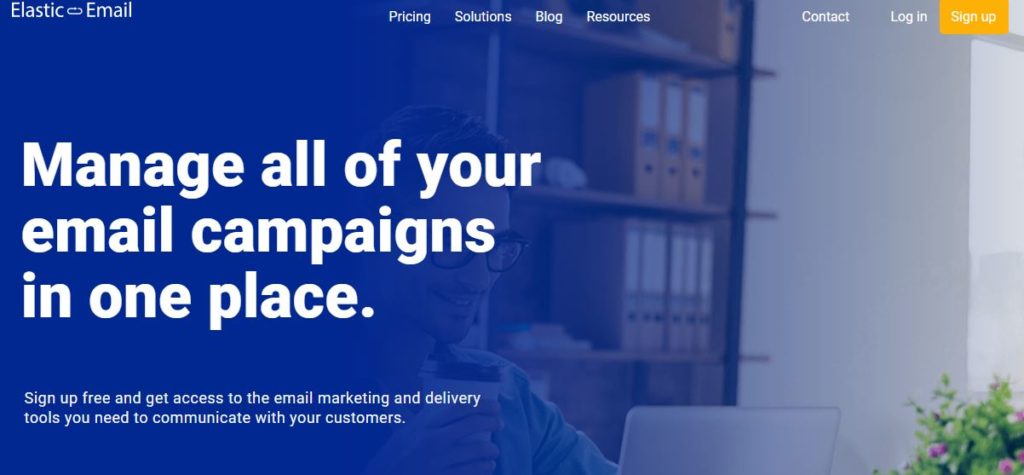
ElasticEmail- much more affordable than Mailchimp- around 9 cents US per 1000 emails sent after the free quota of 10,000 emails, at the time of writing. The campaign manager and survey tools are easy to use, if not a little clunky. Design options are more difficult to do, and customisations take time as the drag-and-drop editor is not as friendly as Mailchimp’s.

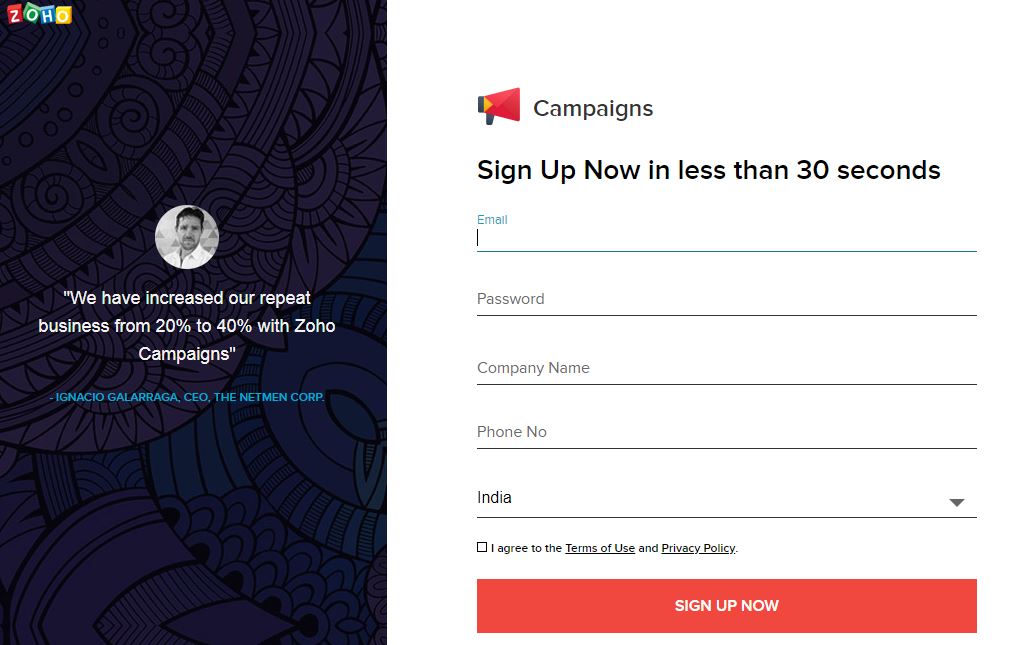
Zoho Campaigns – costs much less than Mailchimp, but works on the same principle of unlimited emails for a list that is priced by Zoho. The editor lacks fluidity and Mailchimp emails regularly turn out more beautiful than the ones made in Zoho. One positive factor is that if you Use Zoho CRM, you get to track campaigns within the same system, which is one less platform to worry about!

There is no clear market leader for SMS service providers you can strike up a deal with. Every sector, state and country will have a different bulk SMS provider. To locate them easily, you can either speak with marketing agents and experts or you can do the next best thing, Google for suitable results. You can start with – ‘Bulk SMS service providers’. Refine your Google search query based on your budget, campaign frequency, location or business reviews. Sieve through the results and arrive at your shortlist- based on SMS quantity, pricing and support. Definitely try to negotiate a deal- there is room for negotiations with the largest of providers. Also, factor in local taxes before you budget for the service.
According to statistics recorded by MailChimp, travel emails receive an average of 20.69% open rate. Tour operators send emails to keep travellers interested. What kind of email are they sending?
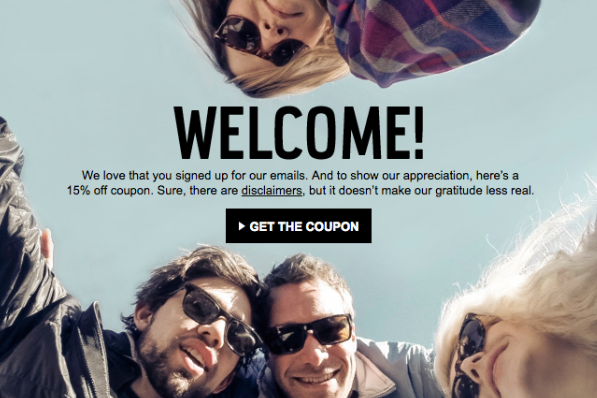
1. Welcome emails – are a great way to greet subscribers. Automate these emails to be sent directly after a prospect hits the subscribe button on the website, Facebook page or one of the ads. Welcome emails should also encourage travellers to explore your business better. If you offer some unique features, use this email to hook the subscriber.

2. Inspirational emails – are used to send the audience on a visual trip. Brief, attractive content intertwined with your service works best. A good example is the “Top destinations” emails by TripAdvisor. Recreate some emails that you see in the travel domain with your own spin, and think about what your customer wants to read. Customise your emails as you get better data on what your clients click on. For example- if your client clicks more on ‘International Tour Packages’, that is a clear indication that you should have more content around international destinations.

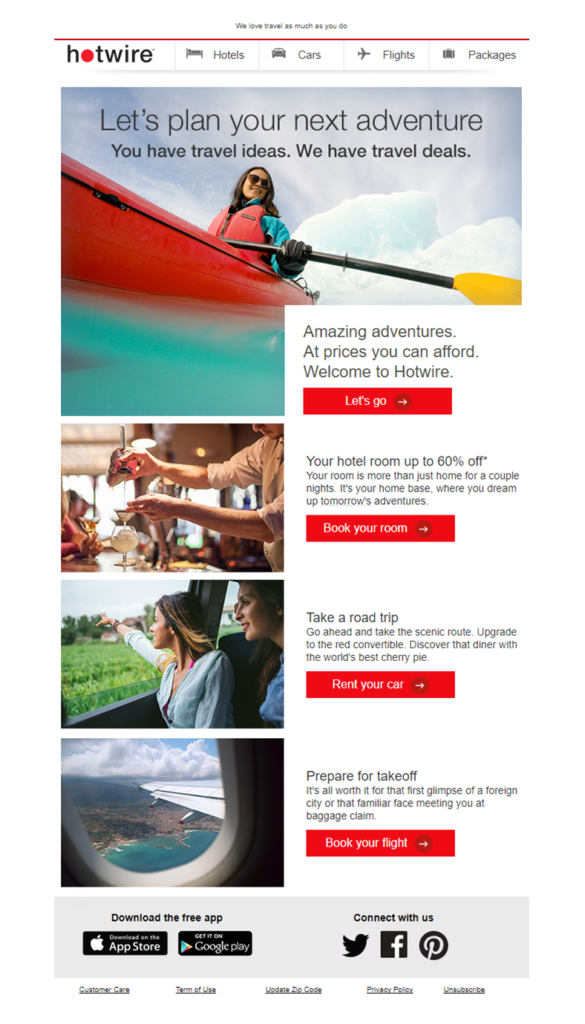
3. Promotional emails – Have an exciting deal to share with travellers? Use this seasonally or as a weekly reminder of the tours on sale, a new set of discounts and coupon codes, free giveaway emails, or loyalty program emails. These kinds of emails must carry a solid bait to lure in customers.

4. Spontaneous emails – could be last minute deals with offers that expire after a given amount of time. Or they could be experience filled emails that spur on spontaneous bookings.

Content is King. Let me rephrase- engaging, compelling content is king. Content is multi-faceted- it pulls audiences from a search engine directly (again, if the content is good), it can be distributed via emails or SMS or used to engage existing clients so they come back for more. While every other lead gen strategy will give you quicker gains and will look like a superstar in the making, very rarely are they sustainable at the same level. On the other hand, content grows steadily. In the long run, it forms the backbone of business.
Our advice- invest in it early and steadily. Like a recurring deposit, it will grow (not too spectacularly) and give you compounding gains in the long run.
You will need a very specific content plan; we will try to define it for you here:
If you start with ‘I don’t know’, we have 2 solutions for you. Do your research (primary and secondary) and learn by doing. Our recommendation is you try both- a multitude of surprises will be in store. Primary research entails going out and asking your clients what they like to read, how they consume content (blogs, video, Facebook,etc.) and how many times till they feel there’s an intrusion in their lives. Secondary research is looking at what the ‘trend setters’, big corporations, and the competition are doing. That will give you clues as to what works and what does not. FInally, learning by doing- just start with something. Eventually, you will get data and you can see what worked best- so you can repeat that more often. Don’t shy away from experimenting as much as you can!
This is the ‘how’ part where most business owners get stuck. If you can write yourself, nothing works better. The content that you write yourself will be engaging and your clients will definitely like hearing from you directly. Sadly, most business owners believe that they can’t write, or find no time to do so. I suggest hiring a freelancer, to begin with. You need to work hard with the content writer to ensure what they write reflects your business. You need to establish a process of explaining what you want, creating an outline for them to follow, and finally checking their work and giving them feedback for improvement.
Measuring content can get tricky. Content writers will charge you per blog, or per word, and then you are just counting words or posts. How do a hundred or ten million words help your business? Remember, this is a lead gen marketing post, we measure everything in revenue. But, it takes time to get to a lead/revenue stage with content. Here are the outcomes you should be measuring:
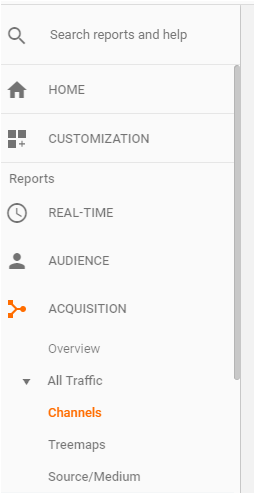
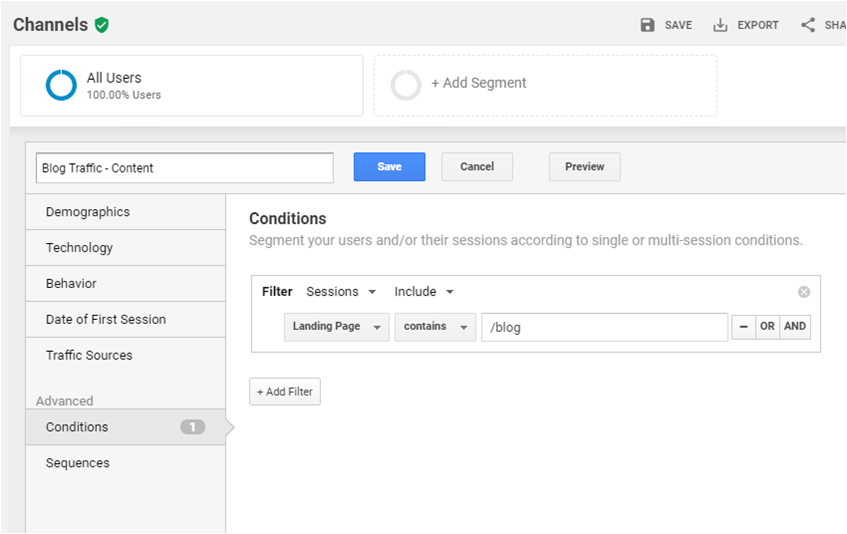
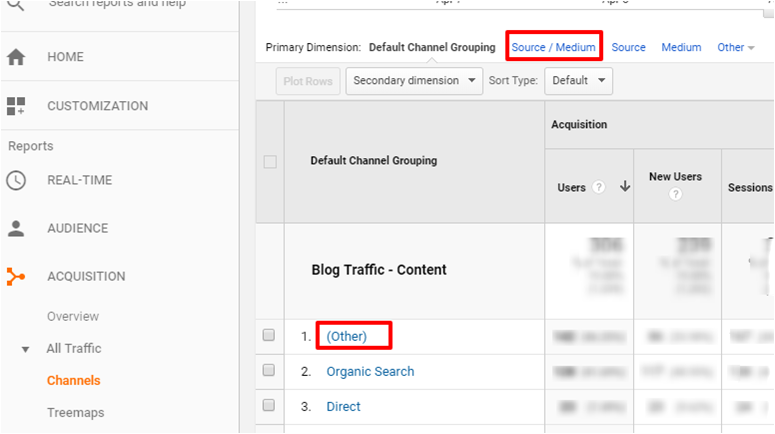
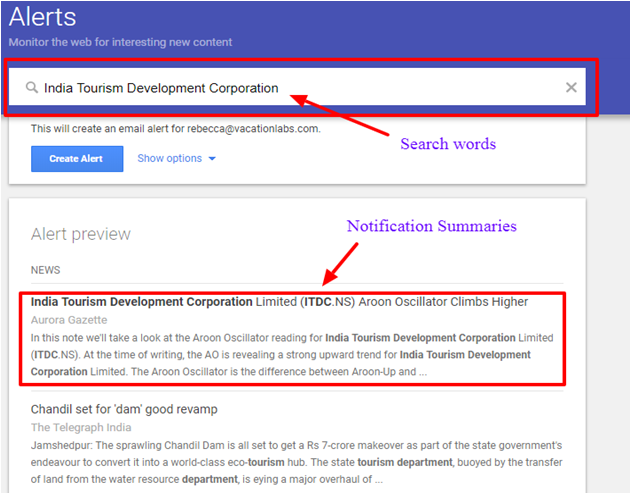
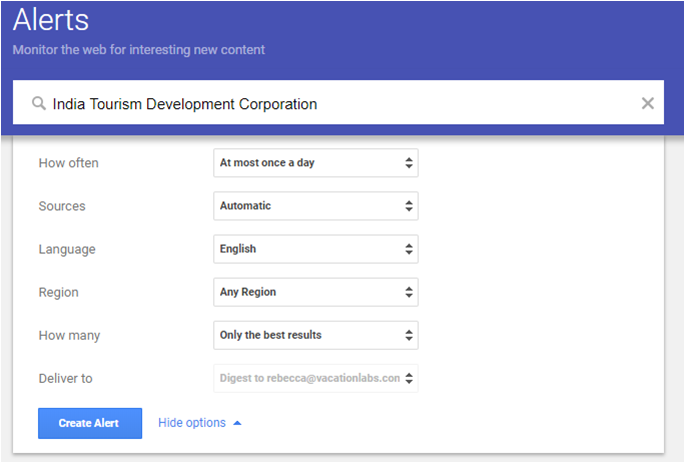
It’s not ideal to post a blog everyday. This has drawbacks like scattered social proof, damaged reader bonding and increased unsubscriptions. What you want to do is select blog posts that your ideal customers would be interested in reading. You can figure out what to post by looking at what your competitors are doing. Based on the responses you receive you can pick your next post. The time/ money it takes to write a good, insightful and exemplified blog will determine how many you can publish in a month. After publishing your blogs online, you need to promote, promote, and promote! You can use email, SMS and social media to get readership. You must monitor the results of your promotion efforts with traffic records on Google Analytics. It can be integrated with any website and is easy to use. You can measure your organic search traffic that comes from searches influenced by SEO, direct traffic which comes from people directly heading to your website, and referral traffic which comes from other websites that have links to your blog content. This is a measure that indicates traffic behaviour. Bounce rate is the percentage of people that come to one of your website pages but leave without seeing any other pages. If this percentage is high, your content was used as research, it was not engaging enough, or you did not provide a call to action for the visitor. Bounce rate can be bad news for your SEO as Google thinks that your content was not relevant or high quality. However, the search engine doesn’t rank your website on bounce rates alone. Time on page is another analytical measure that tells you what people think of your content. The higher the time people spend on your page, more interesting the content is for the visitor. Google considers time on page averages when ranking your web page in search results. To keep people on your pages, publish information that is crisp, factual, and easy to understand. Put yourself in the customer’s shoes and think of what would be interesting from their perspective. It is a good practice to measure your website traffic after regular intervals. This helps you compare data and understand if your SEO, promotions and social media marketing work. At the start of the month, take note of what you are doing differently. Then see if it is impacting your traffic numbers. Leads generated refers to the number of website visitors you managed to convert to interested customers. You must measure this to know if your content is producing fruitful results or is merely serving as an information guide. After all, you do want to sell tours from your content efforts, don’t you? Google Analytics is a tool that quantifies the results of your marketing efforts across your online site and app. Setting up your account is really easy. Once your Google Analytics account is linked to your website, you can measure statistics like web and page traffic, traffic sources, bounce rates, average time spent on page, month on month traffic and lead generation. 1. Tracking website traffic From the options mentioned in the left column of your Google Analytics account, select Acquisition. In the new menu select All Traffic and Channels. Now, from the calendar on the top right, pick the days, weeks or months you want to see your website traffic for. 2. Tracking blog traffic For this, you can follow the same process as above. The only additional step is selecting the blog segment created for your website. To create a blog segment, select Add Segment -> New Segment. Name your segment something like Blog Traffic then select Conditions from the menu on the left. From the first drop-down menu pick Behaviour and Landing Page. In the text field type /blog and save. 3. Tracking top blogs for the month For this, select the Behaviour option from the menu on the left, then Site Content and All Pages. Now, from the calendar on the top right, pick the days, weeks or months for when you want to see the best performing blogs on your site. 4. Tracking email, SMS and social media traffic You can use Google Analytics to measure your traffic from emails, SMS, social media and so on. For this you will need to create UTM codes to track where exactly your traffic is going. You can use Campaign URL Builder for this. After this, you can follow the steps to track website traffic and select (other) or Source/Medium from the options available in the results you see. Travel news blogs – To follow the latest travel trends, you can pick up things like travel statistics, new tourism policies, travel safety tips, new tourist attractions and more. They serve as good inspiration for blog topics. Some publications you can follow are Skift, TravelHQ and Tnooz. Becoming a travel blogger blogs – With the help of these blogs you can figure out the art of blogging in the travel industry. You need to know that this is not just writing down words, but much more effort needs to go into blog content. Follow experienced travel bloggers who provide tips and tricks to create your own. They should provide information on SEO, content quality, analytics and content distribution. Here’s a great one you can start with – Expert Vagabond. Travel blogger blogs – These are travel accounts covered by actual travellers. What you need to see are the experiences customers enjoy. Notice the tips on offer and incorporate them into your content. Subscribe to as many of these blogs as you can but start with the ones which are relevant to your business. For example, if you offer hiking tours, check out travel bloggers who do specific writeups to this travel segment. For inspiration, you can check out this list of travel bloggers. Competitor and OTA blogs – You already know your competition. If you don’t, find them by doing a quick Google search or searching them on OTA websites (MakeMyTrip, Cleartrip, Viator, TripAdvisor). Check if they have a travel website with a blog. Review the content for writing ideas and content styles. Follow their social media feed too for ideas on what kind of content they prefer posting. The same goes with OTA websites. TripAdvisor has its own blog and sends out emails to subscribers regarding top beach destinations in India and similar topics, which travellers find useful. Review blogs – These are similar to review pieces on TripAdvisor. Review blogs cover the customer’s view of what made a trip exciting or disappointing. With this information, you can create a post of what to expect and what not to expect. You’ll also learn just how much information travellers are seeking before their trip. You can also use good review posts related to your business to boost the quality of your write-ups by linking to them. Google Alerts is a tool by Google that helps you monitor the internet for information on specific topics. They work as free email notifications with summaries for the keywords/ search words you are interested in. To start using Google Alerts, you need a Google account. Make sure you are signed into your account when you head to the Alerts page – google.com/alerts. In the text bar type, the search words you are interested in then click the ‘Create Alert’ button. To customise your Google Alerts, you can select ‘Show Options’ and set how often you want to receive alerts, from which sources (i.e. blogs, news, web, finance, videos, books, web, discussions and so on. News is the most preferred option. However, blogs are also helpful.) You can select more than one option, set the language, region of origination, and the breadth of results. See the image below. For example, if you specialize in Coorg tours, here are some Google Alert search words you can use – Number of blogs/words
Traffic on Blog
Bounce Rate
Time on Page
Traffic change month on month
Leads generated
Measuring your content marketing outcome with Google Analytics


5 great travel blogs that you should follow
Keep up with your Industry
Set up Google Alerts
What can you learn with Google Alerts
How to set up Google Alerts


This channel holds a lot of promise for businesses of any size. This is also simultaneously the source of the most amount of anguish for many businesses. Entry barriers to digital marketing are very, very low as compared to, say, a marketing hoarding/advertisement at the airport. So, while every agency and freelance marketer will claim to be an expert and want to rope you in as a client, the ‘proof is in the pudding’, that is, the results they deliver. Remember, measurement will always be in terms of impact on the business- i.e., leads and revenue. Aim to get a 1X impact when you begin with the program (spend to revenue). And, increase it to 2X within 2 months.
Before we can tackle the digital channel in earnest, we need to bring you up to speed with a few things first:
We have already covered the process of checking traffic to your website and blog through the free Google Analytics tool (in the content section). But, there are still a few minor details you need to understand to make the most of it.
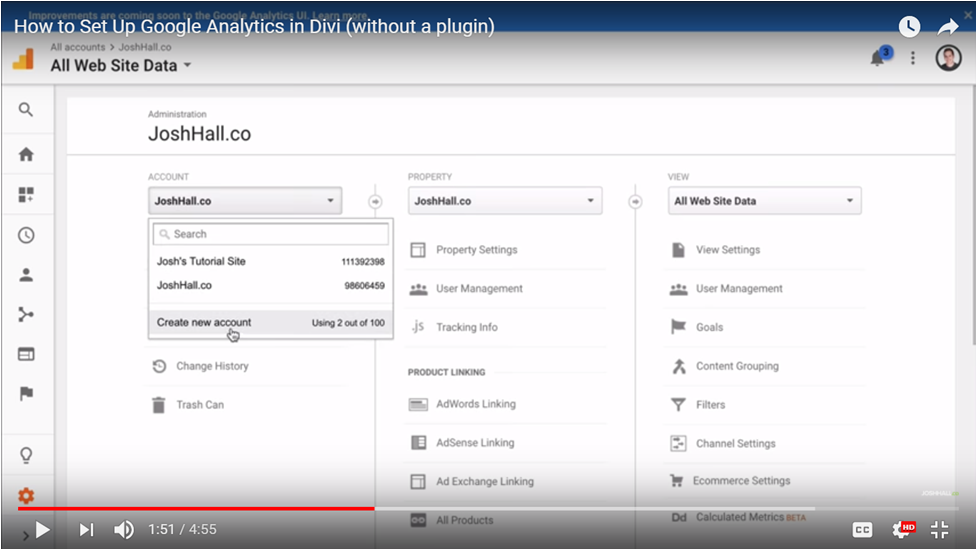
First, you will need a Google account. Log onto- www.google.com/analytics. Now, sign up for the tool. Once you have this setup, sign in to the Analytics section. From the Analytics dashboard select the Admin option and create an account for your website. Follow the screenshots to see what you need to do for this.

Source: Josh Hall Youtube channel
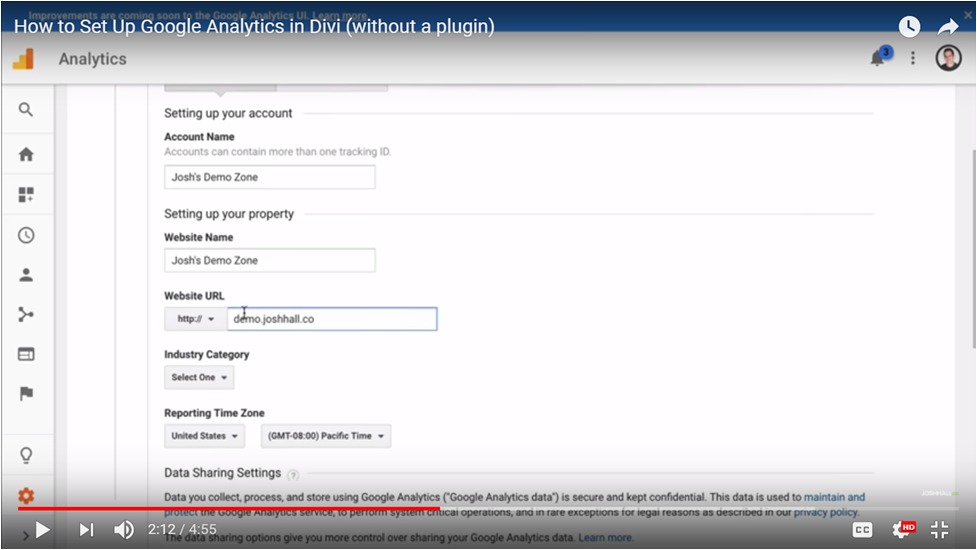
After selecting Create A New Account, you need to add your website details, like admin name, website name, website url, industry category (i.e. travel), country and time zone.

Source: Josh Hall Youtube channel
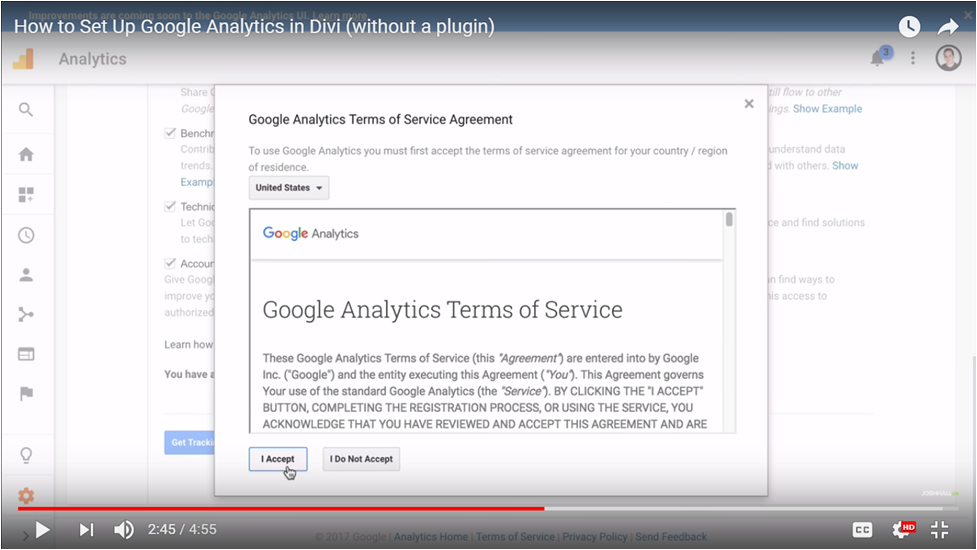
Once this is done, select Get Tracking ID and accept the Google Analytics services terms and conditions.

Source: Josh Hall Youtube channel

Source: Josh Hall Youtube channel
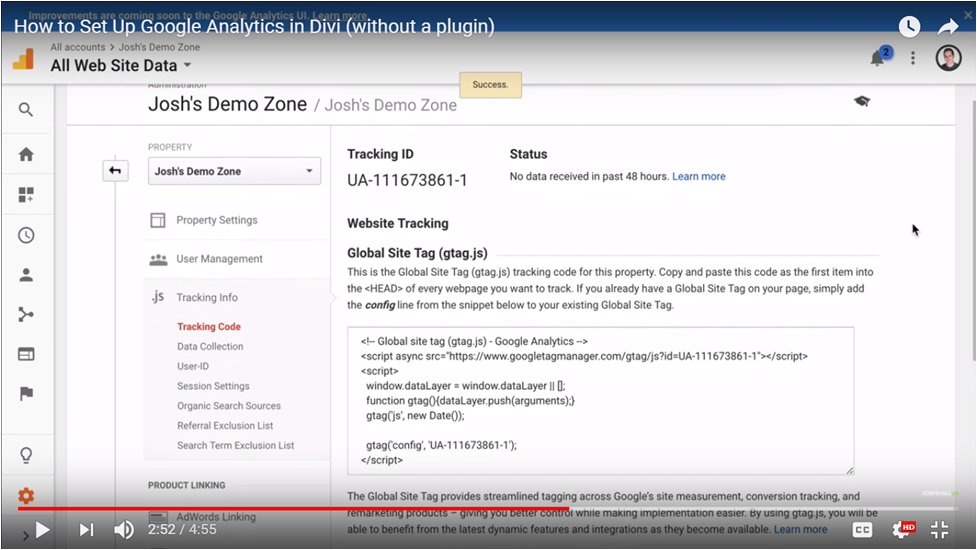
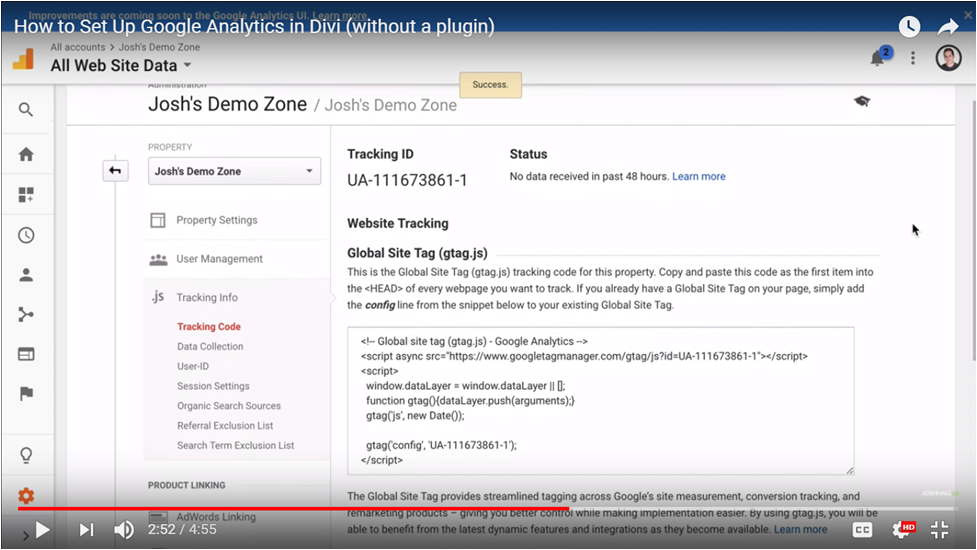
After this step, you will receive a code provided by Analytics like you see here –

Source: Josh Hall Youtube channel
Copy the code and head to your website and add it to the backend. For information on how to do this for your website built with Vacation Labs, email us at support@vacationlabs.com or call us at – +91 7798722177. If you use a WordPress website, then head to the themes editor section, pick out the headers.php file, and paste the code in the relevant section.
On the Analytics dashboard, you will see active users and where they are currently on your website. But, the real muscle of this tool is on the left side under reports.
This section gives you details about your website visitors. Which countries is the traffic originating from (go to Audience – Geo – Location and you will see highlighted sections of the world map), regions this traffic comes from, the exact list of countries (names and number of users), and the most active states/ regions/ cities. The Demographic view lets you study the gender and age of your website viewers. This information is useful for you to improve your writing style, your receptiveness to your main audience or customise your marketing efforts to reach the actual target audience. Under Technology – Mobile, you can see how many people view your website on mobile and desktop. You can accordingly create and optimize content to suit these viewer’s needs.
As we discussed, this section shows you where your website traffic is coming from, for example, organic searches, social media, referrals, advertising (exact source), and so on. All you need to do is head to Acquisition – All Pages – Channels. This will give you a view of your traffic sources. When you click on Social, you will see all the platforms that are bringing in the traffic like Facebook, Twitter, Youtube, etc. and how much traffic they bring can also be seen. In the Behaviour section, you can check out which pages are getting the most views on your website. Simply click Behavior – Site Content – All Pages and the view you get is your website traffic for the past 7 days. You can adjust the time frame to a day, a week, month or year. The first thing you will see is a slash (/ ) with the highest number of page views (usually). This represents your website’s homepage. You can head to specific pages too by typing /blog or /pricing or /your-tour-name in to the advanced search bar at the top of the results you see. It will show exactly how much traffic these pages receive. This text that you type is usually what appears after your website address. For example, www.vacation labs.com/blog. From Behavioral Flow, you can see where people are coming from and where they are headed when on your website. For example, they land on your homepage then go to your snorkelling tour packages page, then scuba diving page and exit at the bookings page. Digital media ranges far and wide, and to reign in the breadth of the discussion, we will discuss only the most relevant sub-channels for tour operators: The quintessential channel to target highly relevant text ads to potential customers. You need to start with the Google Adwords platform (adwords.google.com). Once you have signed in, or created your account, linked it with analytics, and are ready to go, you need to select one of 2 types of ads. Search ads (text) or Display ads (display, banner). In the first section, we are targeting search ads. In general, you need to think your AdWords campaign through and be extremely careful. Let me draw an analogy here. Think it’s your first day as a newbie stock trader. If you go big on the first day, there is almost certain that you will go home early. Search ads are very relevant, so nearly everyone is using the platform. Now, let me exemplify. Think of a scenario where your refrigerator broke down and you live in Goa (Area A). If you don’t already know a repair guy, or your regular repair guy is away, you could try searching “Fridge repair in Area A Goa”. This will usually give you a great set of results. The ad at the top there? That is what we are trying to get to. It might cost you a lot of money to bid for that keyword, or it might be really cheap, and we are trying to help you figure out how to get a call/ lead out of this campaign. It is extremely technical to run search ad campaigns. Here is a crash course relevant for tour operators about to build a campaign. A few concepts: As an example, let’s assume you sell package tours, and you want to target the family summer holiday tourist. For packages for Leh, for instance, Keyword: [5 Day Leh trip] Exact match keyword with very specific details. Ad Copy: Summer Break in Leh? Book the Perfect 5 day Trip Flights, Hotels, Private Taxi, perfect holiday & perfect prices. See Details. You will find lots of reading material, tips and tricks for Google Adwords online, here are a few resources for you to use- While display marketing, prima facie, is easier to set up than Search Engine marketing, it is as deep, if not more. Display marketing is essentially broken up into multiple categories, basis the way it is targeted. In most real situations, there are 2 ways to look at Display Marketing on Google: Quick Tip: There are a LOT of banner sizes you can decide to launch on Google. But, we will make your life easier. In our experience, if you stick to these 14 banner sizes, you should cover 90%+ of the available ROI. With Facebook marketing, there are multiple components you need to be familiar with. You must have a business page and build your presence through it. It’s all worth the effort because this is where your customers are likely to spend a great deal of time. Next, Facebook is an affordable form of digital marketing, it allows you to interact with potential buyers and it assists with content marketing. Facebook marketing overall is a big chunk of what a tour operator does, so we have covered this in a completely separate article, which is available here: www.vacationlabs.com/facebook-marketing.
Overall, why digital works is because it is very easy to set up and start. Most people can just begin using this channel and start getting ads immediately. Go ahead and start. If you are a Vacation Labs client, call up your account manager- he will help you get set up. If you are not, Sign Up here to become one. Else, the more you experiment, the better you will get. Sign up! We hope you enjoyed reading this article as much as we did writing it up for you. Leave your comments below or write to marketing@vacationlabs.com for feedback. We would love to hear from you! Acquisition
Behavior
Digital Marketing & Digital Media
1
Search Engine Marketing
Some tips to remember:
Example:
Further Reading:
2
Display Marketing:
Google Display Marketing

Facebook Marketing