Unlimited team logins on every plan

Unlimited team logins on every plan

Release Notes June 12, 2026

Unlimited team logins on every plan

Running into your account’s user limit meant a frustrating choice: disable a teammate who still needed access, or pay extra just to add one more person.

That cap is gone. Every plan now includes unlimited team logins, so you can give everyone who works on your account their own login at no extra cost.
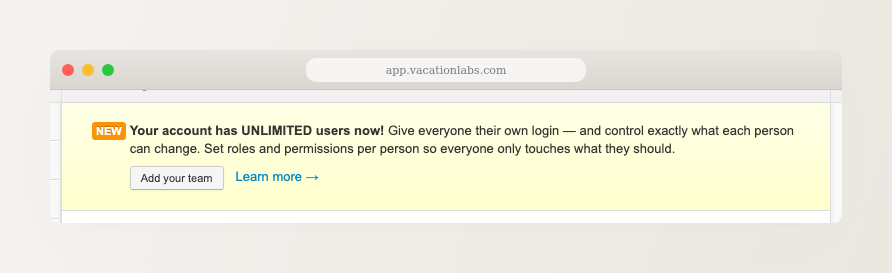
Backoffice desktop screenshot of the Users & Permissions page showing a banner that reads 'Your account has UNLIMITED users now! Give everyone their own login' with an 'Add your team' button.

Giving each person their own login does more than remove a limit:

Everyone signs in as themselves: no more sharing one email and password across the office.
Control what each person can change: assign roles like Reservations Staff, Finance Manager, or Content Manager so each teammate only touches what they should.
A clear record of who did what: because every action is tied to an individual login, you always know who made a change.

This is especially handy in peak season, when you bring on temporary guides or front-desk staff: add them when they start, and disable their login when the season ends, without ever bumping into a limit.

Add and manage your team members →
Available on every plan

A gentle nudge when a login is being shared

Now that everyone can have their own login, we’ve added a small nudge to help teams move away from sharing one. If the backoffice notices the same login signed in from several places at once, a common sign of a shared password, it shows a one-time prompt: “Are multiple people using the same login?”

You get two simple choices:

Add your team: jump straight to inviting teammates so each person gets their own login.
Not shared? Sign out other sessions: if it was just you on your own laptop and phone, sign out the other sessions in one click.

It’s a nudge, not a nag. Dismiss it with “Remind me later” and it stays out of your way for a day, and it waits its turn behind other prompts so it never piles on.
SCREENSHOT NEEDED: Backoffice screenshot of the shared-login nudge modal titled 'Are multiple people using the same login?' with 'Add your team', 'Not shared? Sign out other sessions', and 'Remind me later' buttons.

Learn what the shared-login prompt means →
Available on every plan

Set-up dynamic pricing for your tours right away

Sign up today and get a free 14-day trial!