Release Notes
New features, improvements, and fixes shipped to your Vacation Labs account.

Add a Hero Content Block to your website pages
Hero Content Block You can now add a Hero Content Block to your website: a full-width band with a small label, a headline, a short paragraph and up to two buttons, over a background photo or a solid colour. It works on static pages, on blog posts, and on collection pages that use the section-based […]
Read more →
Add dropdowns and number fields to your inquiry forms
Dropdowns and number fields on your inquiry forms Your inquiry forms can now ask two kinds of question they could not ask before. Both types are checked on submission, appear in your backoffice inquiry views, and flow through to your CSV exports and your API and webhook integrations. Reassure visitors just before they submit Inquiry […]
Read more →
Smarter inquiry management: auto-assignment, bulk CSV import, and staff access controls
This release brings three improvements to how you handle inquiries: bring them in from outside channels in bulk, route new ones to the right salesperson automatically, and control which inquiries each member of your team can see. Assign new inquiries automatically Before this update, every new inquiry landed in one shared list, and someone had […]
Read more →Inquiry acknowledgement email no longer shows an empty travel-plan section Fix
Fixed an issue where the automated inquiry acknowledgement email showed an empty “Your Travel Plan Info” section (just a heading, with no details beneath it) when the inquiry form did not collect a trip, departure date, or traveller count, for example on a careers or general contact form. That section is now hidden when there is nothing to show, and the customer’s contact details expand to fill the space.
Report date filters now include the full end date Fix
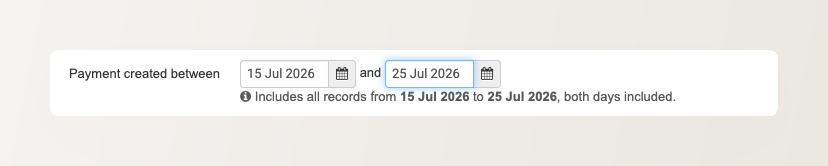
Fixed an issue where report date-range filters treated the selected end date as the very start of that day, so records created later on the end date were left out. Picking 1 to 30 June, for example, excluded everything from 30 June itself. The end date is now inclusive of the whole day across the Payments, Accounting, Sales, Agent, bookings-CSV, and hotel-settlement reports. A hint under the date pickers now confirms that both the start and end dates are included, so the range is unambiguous.
Popup inquiry form no longer resets the page to the top Fix
Fixed an issue where opening or closing a popup on a website page (the popup inquiry form or the search popup) reset the page to the top instead of leaving the visitor where they were, forcing them to scroll back down to keep browsing. The page now stays locked at the visitor’s exact position while the popup is open, and returns to it on close, on both desktop and mobile. On desktop, a tall popup inquiry form now scrolls within itself, so the Close and Send buttons stay visible instead of scrolling out of reach.
Grant Analytics dashboard access without Super User Improvement
You can now give a team member access to the Analytics dashboard on its own, without making them a Super User. Seeing your website’s traffic and booking trends no longer means handing over full access to the backoffice. You grant the Analytics permission to just the people who need it, and nothing else.
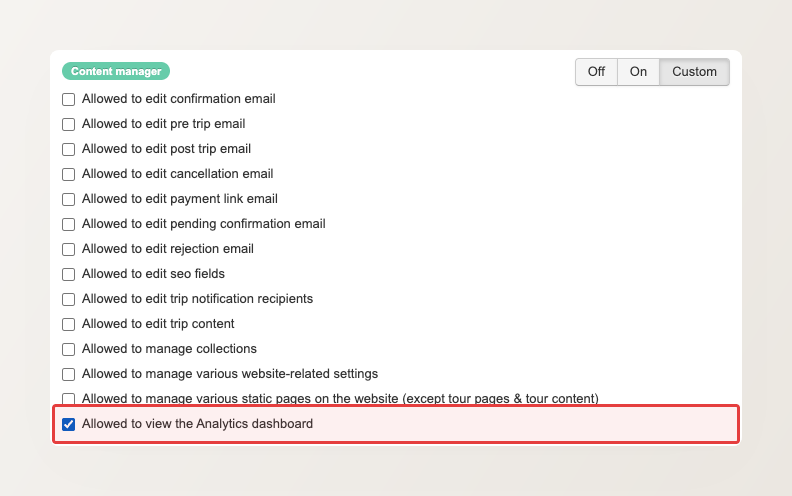
By default, the Analytics permission sits inside the Content Manager role, on the reasoning that whoever manages your website content is usually also the person most likely to watch its traffic and booking trends. If that is not how your team works, you can hand this one permission to anyone. Edit the user under Main menu > Settings > Users & Permissions, set the Content Manager role to Custom (the mode that lets you switch permissions on one at a time), then tick just Allowed to view the Analytics dashboard and leave the rest off. The Analytics link stays visible to everyone on your team, but opens only for the people you have granted it to.
We also restored Inquiry Report access for existing users on the Reservation Staff, Reservation Manager, and Finance Manager roles. A setup error had previously left it switched off for some of them.
Unlimited team logins on every plan
Unlimited team logins on every plan Running into your account’s user limit meant a frustrating choice: disable a teammate who still needed access, or pay extra just to add one more person. That cap is gone. Every plan now includes unlimited team logins, so you can give everyone who works on your account their own […]
Read more →
Get better cashflow and reward customers who pay in full
Coupons that require full payment You can now create coupons that require customers to pay the full booking amount upfront. When a customer applies one of these coupons, the option to pay only a partial deposit is automatically switched off, and they pay in full to confirm the booking. Until now, a coupon only changed […]
Read more →